
KDP Cover Dimensions: Complete Guide to Paperback, Hardcover, and Spine Measurements
Choosing the correct KDP cover dimensions is an important part of preparing a book for Amazon Kindle Direct Publishing. Your cover must match the interior manuscript’s trim size, page count, and printing specifications. If the measurements are incorrect, your design may not align properly during printing or could fail the cover review process.
Whether you are publishing a novel, journal, workbook, or educational book, understanding Amazon KDP cover dimensions will help you prepare a professional print-ready design.
In this guide, we will explain paperback and hardcover dimensions, standard book sizes, spine width calculations, bleed requirements, safe margins, and the correct way to prepare your cover file.
What Are KDP Cover Dimensions?
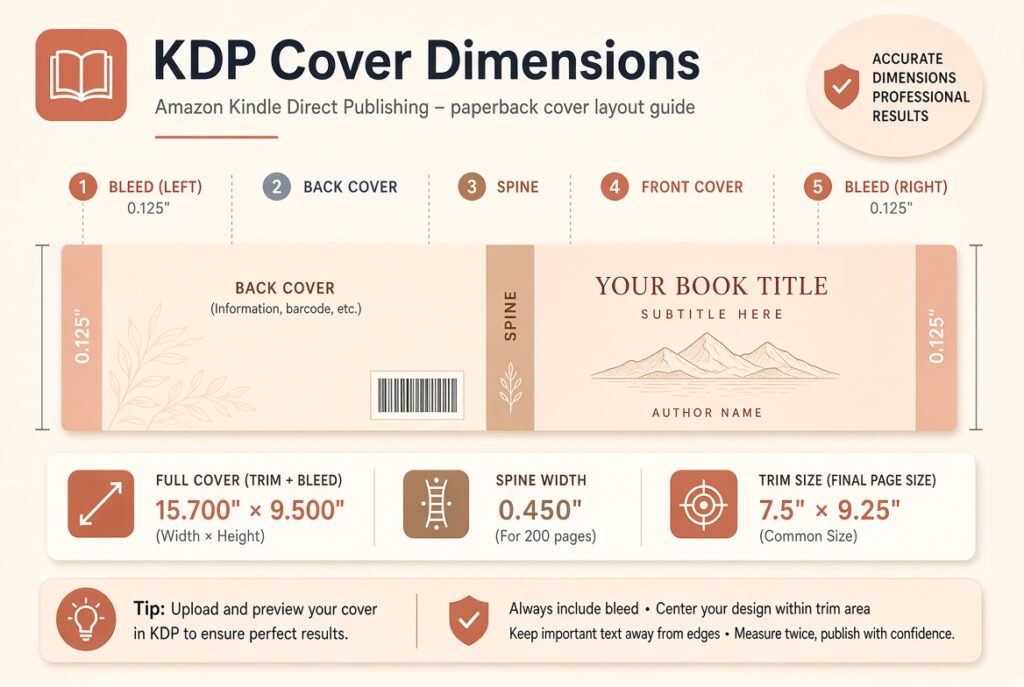
KDP cover dimensions refer to the complete measurements required to create a printed book cover. Unlike an eBook cover, which usually consists of a single front-facing image, a paperback or hardcover cover includes multiple sections.
A complete paperback cover contains the front cover, back cover, and spine. It also includes additional space for bleed to account for the printing and trimming process.
The final dimensions depend on four important factors: trim size, page count, paper type, and binding format.
For example, a 6 × 9-inch paperback with 200 pages will have different full-cover dimensions from a 5 × 8-inch book with 300 pages. Even when two books have identical trim sizes, their spine widths can differ because of their page counts and paper selections.
This is why you should determine your final manuscript specifications before creating the cover design.
KDP Paperback Cover Dimensions
Paperback books are among the most commonly published formats on Amazon KDP. They have flexible covers and are suitable for novels, business books, biographies, educational publications, and other reading materials.
The complete paperback cover is created as one continuous layout containing the back cover, spine, and front cover.
For a paperback cover, the overall dimensions are calculated using the following formulas:
Full Cover Width = Back Cover Width + Spine Width + Front Cover Width + 0.25 inches
Full Cover Height = Trim Height + 0.25 inches
The additional 0.25 inches accounts for 0.125 inches of bleed at the top and bottom, as well as at both outside edges of the full cover.
For example, a book with a 6 × 9-inch trim size has a final cover height of 9.25 inches, including bleed. Its total width depends on the spine measurement.
Common KDP Book Trim Sizes
Trim size refers to the final width and height of a printed book after it has been cut to its finished dimensions.
Amazon KDP offers multiple trim sizes for different types of publications. Your selection should depend on the content, design, and intended reading experience.
| Trim size | Common book type |
|---|---|
| 5 × 8 inches | Fiction and novels |
| 5.25 × 8 inches | Novels and general reading |
| 5.5 × 8.5 inches | General nonfiction |
| 6 × 9 inches | Business and educational books |
| 6.14 × 9.21 inches | General nonfiction |
| 7 × 10 inches | Workbooks and manuals |
| 8.5 × 11 inches | Educational books and large workbooks |
These are examples of commonly used formats, not a complete list of available KDP sizes. Availability and page-count limits depend on the selected printing specifications.
Which KDP Trim Size Should You Choose?
The right trim size depends on the type of book you are publishing.
A 5 × 8-inch format is a practical choice for compact fiction books and novels. A 6 × 9-inch format is popular for general nonfiction, business publications, and educational material because it provides a comfortable balance between page space and portability.
For workbooks, activity books, and publications containing charts or illustrations, larger formats such as 8.5 × 11 inches may be more suitable.
Before selecting a size, consider how your manuscript will look when printed. Changing the trim size can affect page layout, pagination, and spine width.
How to Calculate KDP Spine Width
Spine width is the thickness of the printed book and is an essential part of the overall cover dimensions.
It depends on the total number of interior pages and the paper type selected for printing. A higher page count generally produces a wider spine.
For paperback books, Amazon provides different calculation factors depending on the interior printing and paper selection.
Paperback Spine Width Formulas
| Interior paper type | Spine width formula |
|---|---|
| Black ink, white paper | Page count × 0.002252 inches |
| Black ink, cream paper | Page count × 0.0025 inches |
| Premium color paper | Page count × 0.002347 inches |
| Standard color paper | Page count × 0.002252 inches |
| Groundwood paper | Page count × 0.00235 inches |
These formulas allow authors to estimate the spine width of a paperback book.
KDP Spine Width Calculation Example
Suppose you are publishing a 200-page paperback book using black ink and white paper.
The calculation will be:
200 × 0.002252 = 0.4504 inches
Therefore, the estimated spine width is 0.4504 inches.
If you select cream paper instead, the calculation becomes:
200 × 0.0025 = 0.5 inches
This demonstrates why selecting the correct paper type matters when preparing your cover.
Always use the final dimensions generated for your specific book specifications when creating the print-ready design.
KDP Full Cover Dimensions: Practical Example
Let’s calculate the complete cover dimensions for a hypothetical paperback book.
The book specifications are:
| Specification | Selected value |
|---|---|
| Binding | Paperback |
| Trim size | 6 × 9 inches |
| Interior printing | Black and white |
| Paper type | White |
| Page count | 200 |
| Spine width | 0.4504 inches |
The full cover width is:
6 + 6 + 0.4504 + 0.25 = 12.7004 inches
The full cover height is:
9 + 0.25 = 9.25 inches
This example shows why you cannot use the front cover dimensions alone when preparing a complete paperback cover. The spine and bleed must also be included.
KDP Hardcover Cover Dimensions
Hardcover books have different construction requirements from paperback books. They use rigid covers, and their dimensions include additional areas for wrapping and binding.
A hardcover cover is not simply a paperback cover with thicker material. Its layout must account for the hardcover board, hinges, and wrapping areas.
The final measurements depend on the selected trim size, page count, paper type, and hardcover specifications.
For this reason, you should not use paperback spine formulas or paperback templates to prepare a hardcover design.
Instead, select hardcover in the KDP cover template generator and use the exact dimensions provided for your book.
Hardcover books are commonly used for premium editions, gift books, photography publications, and professionally presented nonfiction titles.
Understanding KDP Bleed Requirements
Bleed is additional space outside the final trimming boundaries of a printed book. It allows background colors, photographs, and other design elements to extend to the edges without leaving unwanted white borders. For KDP print covers, the required bleed is 0.125 inches (3.2 mm) on the outside edges.
For example, if your book has a trim height of 9 inches, the full cover height must include an additional 0.25 inches to account for the top and bottom bleed.
Designers should extend background images into the bleed area while keeping important text and other essential elements away from the trimming boundaries. Ignoring bleed requirements is a common reason for cover formatting problems.
What Is the Safe Area in a KDP Cover?
The safe area is the region where important design elements should remain to prevent them from being trimmed or shifted during printing. Your book title, author name, subtitles, and other essential text should be positioned carefully within the recommended boundaries.
For paperback covers, Amazon recommends keeping content that should not be trimmed at least 0.25 inches from the outside cover edge. Front and back cover text must also remain at least 0.125 inches inside the trim lines. The spine has separate safe-area requirements. KDP requires at least 0.0625 inches of space between spine text and each edge of the spine. These margins help prevent important information from appearing too close to a fold or cutting boundary.
KDP Spine Text Requirements
Spine text makes a book easier to identify when it is placed on a bookshelf. Authors commonly include the book title and author name.
However, not every printed book has enough spine space for readable text.
Amazon KDP only prints paperback spine text when the book contains at least 79 pages. Cover Creator has a minimum requirement of 80 pages for spine text.
Even when your book meets the page requirement, make sure the spine is wide enough for the text to fit comfortably.
Avoid using oversized fonts or placing text too close to the spine edges. A simple, readable spine design generally works better than trying to fit too much information into a narrow area.
KDP Cover Image Resolution and PDF Requirements
Correct dimensions are only one part of preparing a print-ready cover. Image quality and file settings also matter.
Amazon requires cover images to have a minimum resolution of 300 DPI. Low-resolution artwork may appear blurry or pixelated when printed.
For custom paperback covers, your complete design must be submitted as a single PDF file containing the back cover, spine, and front cover.
Before uploading, make sure the PDF dimensions match the generated template. Fonts should be embedded, transparent objects and layers should be flattened, and unnecessary crop marks, guides, comments, and placeholder text should be removed.
It is also important to inspect the final design using KDP Print Previewer before submitting your book.
How to Check Whether Your KDP Cover Dimensions Are Correct
Before publishing, review your design against the specifications used for your interior manuscript.
Start by checking the trim size and final page count. Confirm that the paper and printing options match your KDP book setup. Then compare the full cover width, height, and spine measurements with the generated template.
Pay particular attention to the bleed, spine safe area, barcode placement, and text margins.
If you have changed the interior manuscript after creating the cover, calculate the dimensions again. Even a small change in pagination can affect the spine width.
A final review in Print Previewer is one of the best ways to identify measurement and alignment problems before publication.
Common KDP Cover Dimension Mistakes
Incorrect measurements can affect the appearance of your book and create unnecessary delays during publishing.
One common mistake is using the trim size as the complete cover size. The trim size only represents the finished front or back cover area, not the entire full-wrap design.
Another mistake is ignoring the spine width. A cover designed without the correct spine measurement may have alignment problems when printed.
Some authors also forget to extend their background artwork into the bleed area. This can result in unwanted white edges after trimming.
Using outdated templates, selecting the wrong paper type, and changing the manuscript page count without updating the cover are additional problems worth avoiding.
The easiest way to prevent these issues is to work with the final manuscript specifications and use a newly generated cover template.
Frequently Asked Questions About KDP Cover Dimensions
1. What are the standard KDP paperback cover dimensions?
There is no single standard full-cover dimension for every paperback book. The final width depends on the front cover, back cover, spine, and bleed. The height depends on the trim height and required bleed.
2. What is the most popular KDP book size?
The 6 × 9-inch trim size is commonly used for novels, nonfiction books, business publications, and educational material. However, the best size depends on your book’s content and intended readers.
3. How much bleed does KDP require?
KDP requires 0.125 inches (3.2 mm) of bleed on the outside edges of print covers. Your background artwork should extend into this area to prevent unwanted white borders.
4. How wide is the spine of a 200-page KDP book?
It depends on the paper type. For black-and-white printing on white paper, a 200-page book has an estimated spine width of 0.4504 inches. On cream paper, it is 0.5 inches.
5. Can I use the same dimensions for paperback and hardcover books?
No. Paperback and hardcover books have different cover construction requirements. You should generate a separate template for each binding format.
6. What is the minimum page count for KDP spine text?
KDP requires at least 79 pages for paperback spine text. Its Cover Creator tool requires at least 80 pages.
7. What resolution should my KDP cover images have?
Amazon requires cover images to have a minimum resolution of 300 DPI. Higher-quality source images help maintain clarity in the printed book.
8. Can I use Canva for KDP cover dimensions?
Yes. You can create a custom design in Canva using the dimensions from your generated template. Make sure your final document includes the full cover layout and meets the applicable PDF requirements.
9. Do KDP cover dimensions include the spine?
Yes. Full-wrap paperback and hardcover cover dimensions include the front cover, back cover, spine, and applicable bleed or wrapping areas.
10. Why do my KDP cover dimensions change after editing my manuscript?
Your page count may change when you modify text, font size, spacing, or formatting. Since page count affects spine width, you may need to generate a new cover template.
11. Are Kindle eBook cover dimensions the same as paperback dimensions?
No. Kindle eBooks use a separate front-cover image rather than a full-wrap print cover. You should prepare a digital cover according to the applicable Kindle image specifications.
12. What file format does KDP require for a custom paperback cover?
KDP requires a single PDF file containing the back cover, spine, and front cover. The document must match the calculated dimensions and meet the platform’s technical requirements.
Final Thoughts
Getting the correct KDP cover dimensions is essential for producing a professional printed book. Your trim size, page count, paper selection, spine width, and bleed requirements all contribute to the final cover measurements.
Instead of guessing dimensions or copying another book’s measurements, work with your final manuscript specifications and generate a template for the exact printing format you intend to publish.
A correctly sized cover, high-resolution artwork, and properly positioned text can help prevent common formatting issues and prepare your book for a smoother publishing process.